[RDPLINE Use Case] How a Korean Brokerage Launched AI News Summaries on Schedule
2026. 10. 27
[RDPLINE Use Case] How a Korean Brokerage Launched AI News Summaries on Schedule
Sometimes what holds an AI launch back isn't the model. It's the rights.
A leading Korean securities firm added an AI-powered investment insights service to its mobile app. It summarizes news about the stocks a customer holds or follows, and explains why a stock moved, with the underlying articles as evidence. BECUAI supplied the Korean stock news behind the service through RDPLINE.
The challenge: showing news and repurposing news are different rights
Tagging an article as positive or negative doesn't change its content. Summarizing an article, or extracting events from it and showing the result in an app, is different: you are transforming someone else's article and publishing the output. That requires its own rights.
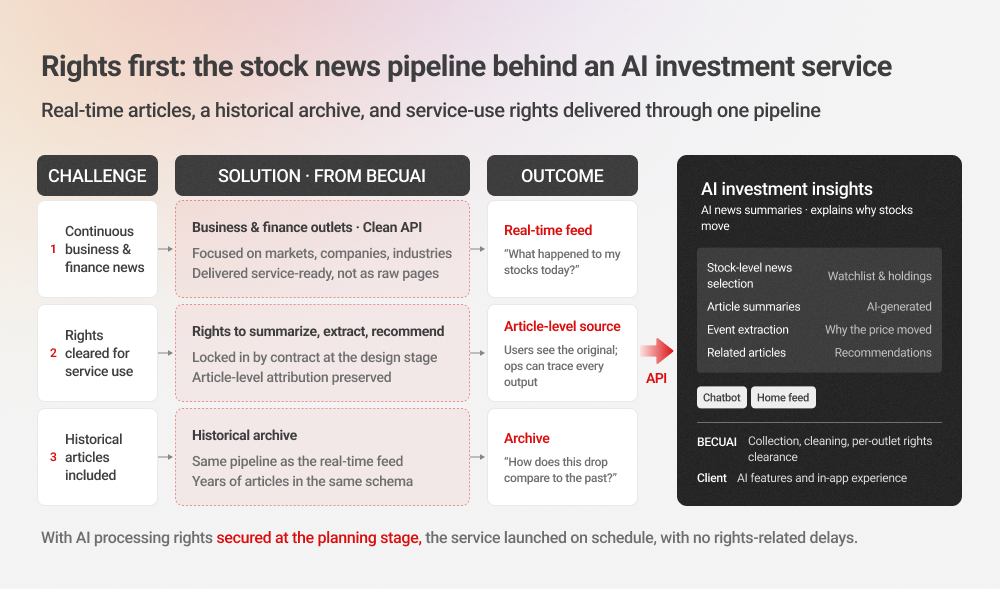
The firm planned three features: summaries of watchlist news, explanations of price moves based on events extracted from articles, and related-article recommendations. All three depended on repurposing rights before they could launch.
Collecting the articles was a challenge of its own. Korean stock news is spread across many outlets, the same story is reported again and again, and keyword search alone pulls in articles that have nothing to do with the stock. The requirements came down to three things:
- A continuous feed of Korean business and finance news
- Rights that cover summarization, extraction, and recommendation
- Historical articles, delivered the same way
Solution 1: rights settled at the design stage
The rights to use news for article summaries, event extraction, and recommendations were written into the contract while the service was still being designed. Article-level attribution was kept as well, so users can open the original under each summary and the operations team can trace any output back to its source.
Solution 2: cleaned and ready to use
BECUAI strips ads and markup from the original pages and adds metadata before delivery, so the client could go straight to building features without a preprocessing step.
| Stage | Type | What it is | Role in the service |
|---|---|---|---|
| 1 | Raw | Source pages mixed with ads, HTML tags, menus | Internal to BECUAI (not delivered) |
| 2-1 | Clean text | Title and body only | The article text the client receives |
| 2-2 | Enriched metadata | Outlet, publish date, keywords, and more | Basis for stock-level selection and source display |
| 3 | Derived | Summaries, extracted events, recommendations | What customers see in the app |
The rights gap sits at stage 3, and the scattered-news problem is solved at stage 2. Because BECUAI delivers stage 2 data and had already secured stage 3 rights by contract, the client could focus entirely on stage 3.
Solution 3: many outlets, one API
Every Korean outlet structures, formats, transmits, and updates its articles differently. Connecting to each one directly means building and maintaining one integration per outlet. RDPLINE replaces all of that with a single interface.
| Direct integration with outlets | Integration through the RDPLINE API | |
|---|---|---|
| Number of integrations | One per outlet | One |
| When an outlet changes its format or delivery | You fix that integration | BECUAI absorbs it upstream |
| When you add or replace an outlet | New integration work | Same integration, no changes |
| Rights and contracts | Managed outlet by outlet | One master contract |
The outcome
The service launched on schedule, with no delays over news rights. "What happened to my stocks today?" is answered by the real-time feed, and "How does this drop compare to similar moves in the past?" is answered by the historical archive. The range of questions a service can answer grows with the range of its data.
The takeaway
Rights to process news with AI belong at the planning stage, not at the end of development. If they surface during the final legal review, the whole launch slips.
Building a similar AI service on Korean news? Let's scope the outlets and usage rights together. Start by checking the data quality in the RDPLINE API test.
_썸네일.jpg)